Small Business TipsEFTPOS Tips & How-to'sNZ BusinessPaymentsSurcharge
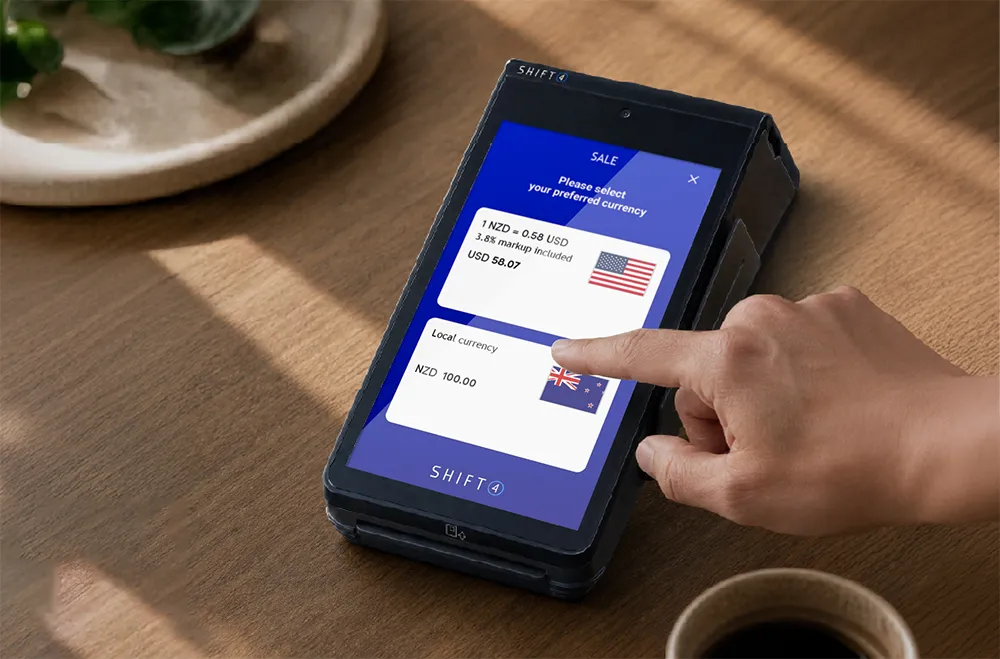
How to Add a Surcharge on Your Shift4 Android EFTPOS Machine
With a Shift4 Android EFTPOS terminal, managing transaction fees and protecting your bottom line has never been easier. Whether you run a fast-paced café, a busy retail store, or a mobile trade business, implementing surcharges allows you to pass on card acceptance costs transparently.
Here is your complete guide to how surcharging works on modern Shift4 Android EFTPOS machines and what you need to know to stay compliant in New Zealand.
What is a Surcharge?
A surcharge is a small percentage or fixed fee added to specific card transactions (such as contactless debit, Visa, Mastercard, or mobile wallet payments like Apple Pay and Google Pay). It covers the Merchant Service Fees (MSF) that businesses incur when processing these types of transactions.
Think of it this way: your customers get the convenience of paying with their preferred tap-and-go or credit method, while your business avoids swallowing the processing fee.
Did You Know? Under the Retail Payment System Act 2022, the Commerce Commission works to keep processing fees fair, but card acceptance—especially contactless and credit—still incurs real costs for Kiwi merchants. Surcharging helps bridge that gap.
The New Zealand Surcharge Rules: What You Need to Know
Never Profit from a Surcharge: Your surcharge rate must only recover the actual cost of accepting the payment method. For example, if your overall Merchant Service Fee is 1.5%, your surcharge should not exceed 1.5%.
Always Provide a Free Payment Option: Merchants must offer at least one fee-free payment method. In New Zealand, this is typically inserting or swiping a physical EFTPOS card and selecting Cheque or Savings. These types of transactions do not incur Merchant Service Fees (MSF) and do not require a surcharge to be applied.
Display Clear Signage: Customers must be notified of the surcharge percentage before they tap or insert their card. Shift4 provides compliant signage templates you can display right next to your counter.
Itemised Receipts: Surcharges must be calculated dynamically and displayed clearly as a separate line item on the customer’s receipt—something Shift4 Android terminals handle automatically.
Single Transaction Collection: The surcharge must be processed as part of the overall purchase amount — never collected separately or as cash.
At the end of the day, all you need to do is be open and transparent about your surcharges. As long as customers understand the rules and have flexible ways to pay, they’ll be happy to accommodate, and it’s a win-win both ways.
Zero Hassle: Pre-Set, Compliant Surcharging Out of the Box
Unlike older payment setups that required manual calculations or complex back-end configurations, Shift4 Android EFTPOS terminals arrive ready to go straight out of the box.
We take the guesswork out of compliance so you can focus on running your business:
Pre-Configured & Ready to Use: Your Shift4 Android EFTPOS terminal arrives pre-programmed with your surcharging profile active—no complicated manual setup or technical install required.
True Cost of Acceptance: Our system is tailored to automatically surcharge only your exact cost of acceptance, ensuring full compliance with Commerce Commission guidelines without risk of overcharging.
Smart Card Detection: The terminal dynamically identifies whether a customer is using standard EFTPOS (no fee) or a surchargable credit/contactless card, applying the correct rate seamlessly at checkout.
Transparent Receipts: The surcharge is calculated automatically in real time and printed as a clear, separate line item on the customer’s receipt.
Simple Settlements: Shift4 retains the surcharge amount and settles 100% of your original sale amount into your bank account.
Want $0 monthly processing bills? Enable automated surcharging. Shift4 retains the surcharge amount and settles 100% of your original sale amount into your bank account. How Settlement Works The customer pays $101 (with a $1 surcharge applied automatically). Shift4 retains the $1 and deposits exactly $100 into your bank account. Your monthly transaction bill is $0.
Unlike other providers, we do not charge to activate the surcharging feature. It’s part of the package when you choose the “No Fees” plan with Low Cost Tap & Pay.
Even better, our surcharging option can drive your Shift4 costs to zero. By combining surcharging with free Android hardware rental*, you can eliminate both merchant fees and rental costs, meaning your end of month bill from Shift4 will be $0.
This is based on how we settle. Unlike other providers that charge on the full transaction amount, we settle the total sale, keeping more money in your pocket. Pretty sweet – right?
Another Option: Shift4 Low Cost Tap & Pay Low Fees
Don’t want to surcharge your customers but still want to cut transaction costs?
With Shift4 Low Cost Tap & Pay Low Fees, you get a simple, low rate across Visa & Mastercard contactless and credit card payments. Combined with free terminal rental* on Android machines, it’s an alternative way to protect your margins without adding fees at the checkout.
Surcharging Made Simple with Shift4
Whether you want to enable surcharging on your Android EFTPOS terminal or explore low-cost processing options, Shift4’s local payment specialists are here to help. We make it super easy to implement contactless payments and surcharges. This ensures your customers are always smiling and can keep a handle on merchant service fees. Get in touch with our payment experts today, or call our Sales team today on 0800 004 905 and make surcharging in your business a breeze.
Every day, our Kiwi Payment Specialists help businesses like yours switch to a payment solution tailored to their business. Let’s chat about your payment needs today.